 sales@doomshell.com
 +91 8005523567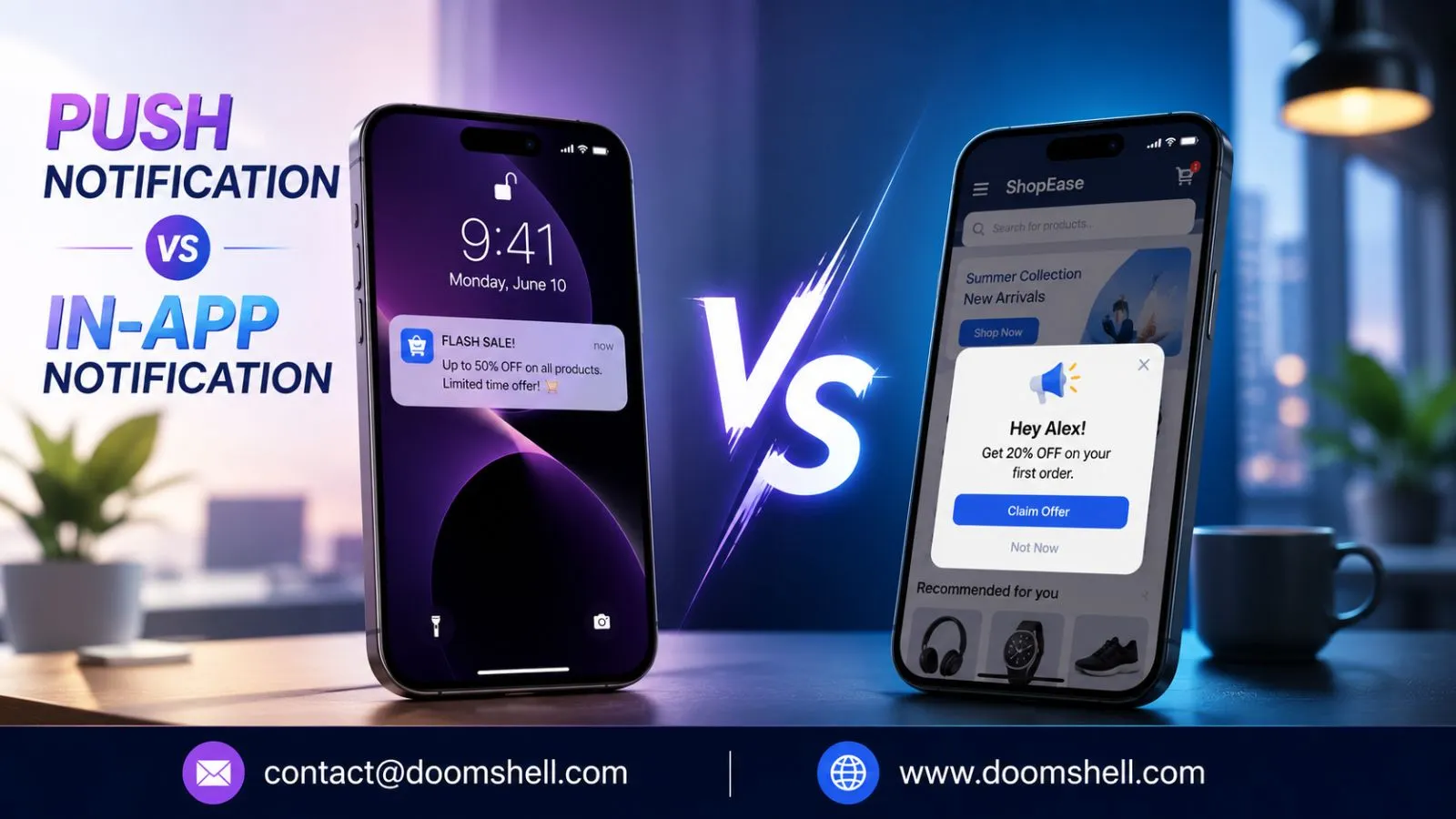
Customer engagement has become one of the most important success factors for digital businesses. Whether you’re running an eCommerce platform, SaaS application, fintech solution, healthcare app, or mobile marketplace, keeping users engaged directly impacts retention, conversions, and revenue.
Two of the most effective communication channels available today are Push Notifications and In-App Notifications. Although both are designed to communicate with users, they serve different purposes. Push notifications are primarily used to re-engage inactive users, while in-app notifications help guide users during active sessions.
Rather than choosing one over the other, modern businesses combine both channels to deliver personalized customer experiences throughout the user journey.
Table of Contents
ToggleMarket Analysis
The customer engagement market continues to evolve rapidly as organizations invest heavily in personalized digital communication.
Current industry trends show:
- Mobile and web push notifications remain one of the most effective channels for user re-engagement.
- Businesses increasingly use in-app messaging to improve onboarding, feature adoption, and customer satisfaction.
- AI-powered customer engagement platforms now combine push notifications with behavioral in-app messaging for better conversion rates.
- Personalized engagement strategies consistently outperform generic broadcast messaging across industries.
As customer expectations continue to grow, companies are investing in omnichannel communication strategies that combine both technologies.
What is a Push Notification?
A Push Notification is a short message delivered directly to a user’s mobile device or web browser even when the application is not actively being used.
These notifications help businesses reconnect with users by sending reminders, offers, alerts, and important updates in real time.
Push notifications are commonly used because they provide immediate visibility on smartphones, tablets, desktops, and web browsers.
Common Push Notification Examples
- Abandoned cart reminders
- Flash sale alerts
- Order updates
- Payment confirmations
- Appointment reminders
- News updates
- Product launch announcements
What is an In-App Notification?
An In-App Notification appears while users are actively using an application. Unlike push notifications, these messages only display during an active session.
They are designed to improve user experience by providing contextual guidance, onboarding assistance, feature recommendations, confirmations, and interactive messages.
Since users are already engaged inside the application, in-app notifications generally achieve higher interaction rates.
Common In-App Notification Examples
- Welcome messages
- Feature walkthroughs
- Profile completion reminders
- Reward announcements
- Survey requests
- Payment confirmations
- Product tutorials
Common Use Cases of Push Notifications
1. Abandoned Cart Recovery
E-commerce businesses use push notifications to remind customers about products left in their shopping carts, helping recover lost sales.
2. Re-engaging Inactive Users
Apps send personalized reminders to users who haven’t opened the application for several days or weeks.
3. Promotional Campaigns
Businesses announce limited-time discounts, festive offers, and seasonal sales using push notifications to drive immediate traffic.
4. Transactional Alerts
Banking, healthcare, and logistics companies deliver payment confirmations, appointment reminders, shipment updates, and security alerts through push notifications.
5. Breaking News & Content Updates
Media companies notify users instantly whenever new articles, videos, or important announcements become available.
Common Use Cases of In-App Notifications
1. User Onboarding
Interactive in-app messages guide first-time users through key features, helping improve adoption rates.
2. Feature Discovery
Businesses introduce newly launched features while users actively explore the application.
3. Process Confirmation
Messages confirming successful payments, registrations, bookings, or profile updates provide immediate feedback and improve user confidence.
4. Customer Feedback
In-app surveys collect user opinions immediately after important interactions, increasing response rates.
5. Personalized Recommendations
Applications recommend relevant products, content, or services based on the user’s current behavior, creating a highly personalized experience.
Advantages of Push Notifications
Instant Reach
Push notifications can reach users even when they are not actively using the application, making them highly effective for re-engagement campaigns.
Higher Visibility
Notifications appear directly on lock screens, notification centers, or browsers, ensuring greater visibility compared to many other communication channels.
Scalable Marketing
Businesses can instantly send promotional campaigns, reminders, announcements, and alerts to thousands or even millions of users simultaneously.
Personalized Communication
Modern engagement platforms allow businesses to segment audiences based on demographics, behavior, location, purchase history, and interests for highly targeted messaging.
Improved Customer Retention
Well-timed push notifications encourage users to return to the application, increasing retention and customer lifetime value.
Advantages of In-App Notifications
Contextual User Engagement
In-app notifications appear while users are actively interacting with the application, making the messages highly relevant and increasing engagement rates.
Better Personalization
Since these notifications rely on real-time user behavior, businesses can deliver personalized recommendations, onboarding assistance, and feature suggestions that improve the overall customer experience.
Improved Feature Adoption
Interactive walkthroughs, tooltips, and guided tutorials help users quickly discover new features, reducing confusion and increasing product adoption.
No Permission Requirement
Unlike push notifications, in-app notifications do not require users to grant device-level notification permissions. Every active user can receive these messages during their session.
Less Disruptive Experience
Because users are already inside the application, in-app notifications feel more natural and are less likely to interrupt daily activities compared to external push notifications.
Disadvantages of Push Notifications
Notification Fatigue
Sending too many push notifications can overwhelm users, causing them to ignore messages, disable notifications, or uninstall the application.
Permission Dependency
Push notifications require users to opt in. If permission is denied, businesses lose an important communication channel.
Limited Message Length
Most push notifications support only short messages, making them unsuitable for explaining complex features or detailed instructions.
Context Limitations
Without knowing the user’s current in-app activity, push notifications may sometimes appear irrelevant or poorly timed.
Risk of Higher Uninstalls
Aggressive promotional campaigns and excessive messaging can negatively impact customer satisfaction and increase uninstall rates.
Disadvantages of In-App Notifications
Limited Reach
In-app notifications only appear when users are actively using the application, making them ineffective for re-engaging inactive customers.
Dependence on Active Sessions
Businesses cannot communicate with dormant users unless they first return to the application.
Poor Timing Can Affect UX
Improperly placed notifications may interrupt important workflows, reducing customer satisfaction.
Higher Development Complexity
Advanced personalization requires analytics, behavioral tracking, customer segmentation, and sophisticated engagement platforms.
Lower Scalability
Unlike push notifications that can instantly reach millions of users, in-app notifications are limited to active sessions, making large-scale campaigns less effective.
Push Notification vs In-App Notification: Key Comparison
| Feature | Push Notification | In-App Notification |
|---|---|---|
| Delivery | Outside the app | Inside the app |
| User Activity | App may be closed | App must be open |
| Primary Goal | Re-engagement | User guidance |
| Permission Required | Yes | No |
| Personalization | Moderate | High |
| Visibility | High | Session-based |
| Rich Content | Limited | Extensive |
| User Experience | Can interrupt users | Contextual and interactive |
| Best Use Cases | Promotions, reminders, alerts | Onboarding, tutorials, confirmations |
Which One Should Businesses Choose?
The answer isn’t Push Notification or In-App Notification—it is both.
Push notifications are excellent for attracting users back to your platform, while in-app notifications maximize engagement after users return.
A balanced engagement strategy typically works like this:
- Use Push Notifications for promotions, reminders, abandoned carts, order updates, and customer re-engagement.
- Use In-App Notifications for onboarding, feature discovery, surveys, progress tracking, and contextual recommendations.
When both channels work together, businesses create a seamless customer journey that improves engagement, retention, and conversions.
Conclusion
The Push Notification vs In-App Notification 2026 comparison shows that each communication channel serves a unique purpose in modern customer engagement strategies. Push notifications excel at reaching users outside the application through timely alerts, promotional campaigns, and reminders, while in-app notifications enhance the user experience with personalized guidance during active sessions.
Instead of choosing one over the other, successful businesses combine both channels to create a complete customer engagement strategy that improves retention, boosts conversions, and delivers a better digital experience.
At Doomshell Software Pvt. Ltd., we help organizations implement intelligent engagement solutions using mobile push notifications, web push notifications, behavioral analytics, and personalized in-app messaging. Our scalable solutions enable businesses to strengthen customer relationships, improve user retention, and maximize long-term growth.
FAQs
1. What is the main difference between Push Notifications and In-App Notifications?
Push notifications are delivered even when users are outside the application, whereas in-app notifications appear only while users are actively using the app.
2. Which notification type has better engagement?
Both serve different purposes. Push notifications are better for re-engagement, while in-app notifications generate stronger interaction during active sessions.
3. Do Push Notifications require user permission?
Yes. Users must grant notification permission before receiving mobile or web push notifications.
4. Can businesses use both notification types together?
Yes. Combining push notifications with in-app messaging creates a comprehensive engagement strategy that improves retention and customer experience.
5. Why choose Doomshell Software Pvt. Ltd. for customer engagement solutions?
Doomshell Software Pvt. Ltd. builds intelligent engagement platforms with personalized push notifications, in-app messaging, automation, and analytics to help businesses improve customer retention and digital growth.