E-Learning App Development helps educational institutions, coaching centres, and businesses deliver accessible learning through mobile technology. A well-designed Android learning platform allows students to attend classes, watch lessons, complete assignments, and monitor progress from one application. However, modern learners expect more than recorded videos and downloadable notes. They need interactive content, personalized recommendations, reliable communication, and flexible access across devices. For organizations planning digital education products, choosing an experienced Android app development company can help turn these requirements into a secure, user-friendly, and scalable platform.
Creating Engaging Mobile Learning Experiences
A successful mobile education platform should make learning simple, interactive, and easy to continue. Students should be able to discover courses, understand lesson structures, participate in activities, and resume learning without unnecessary steps. Mobile-first design is especially important because learners often use smartphones for short study sessions between other activities.
Building Interactive Learning Apps With Android
Interactive learning apps encourage students to participate instead of simply consuming information. Android applications can combine video lessons, quizzes, flashcards, practice exercises, downloadable resources, and progress indicators in one learning environment. These features make course content easier to explore and help learners check their understanding as they move through a topic.
Developers can use Kotlin and modern Android tools to create responsive interfaces with clear navigation. Interactive elements such as quiz cards, lesson checkpoints, badges, and learning reminders can make the experience more engaging. However, gamification should support educational goals rather than distract from them. Points and rewards work best when they recognize meaningful progress, such as completing a module or improving assessment scores.
Creating Mobile Course and Lesson Interfaces
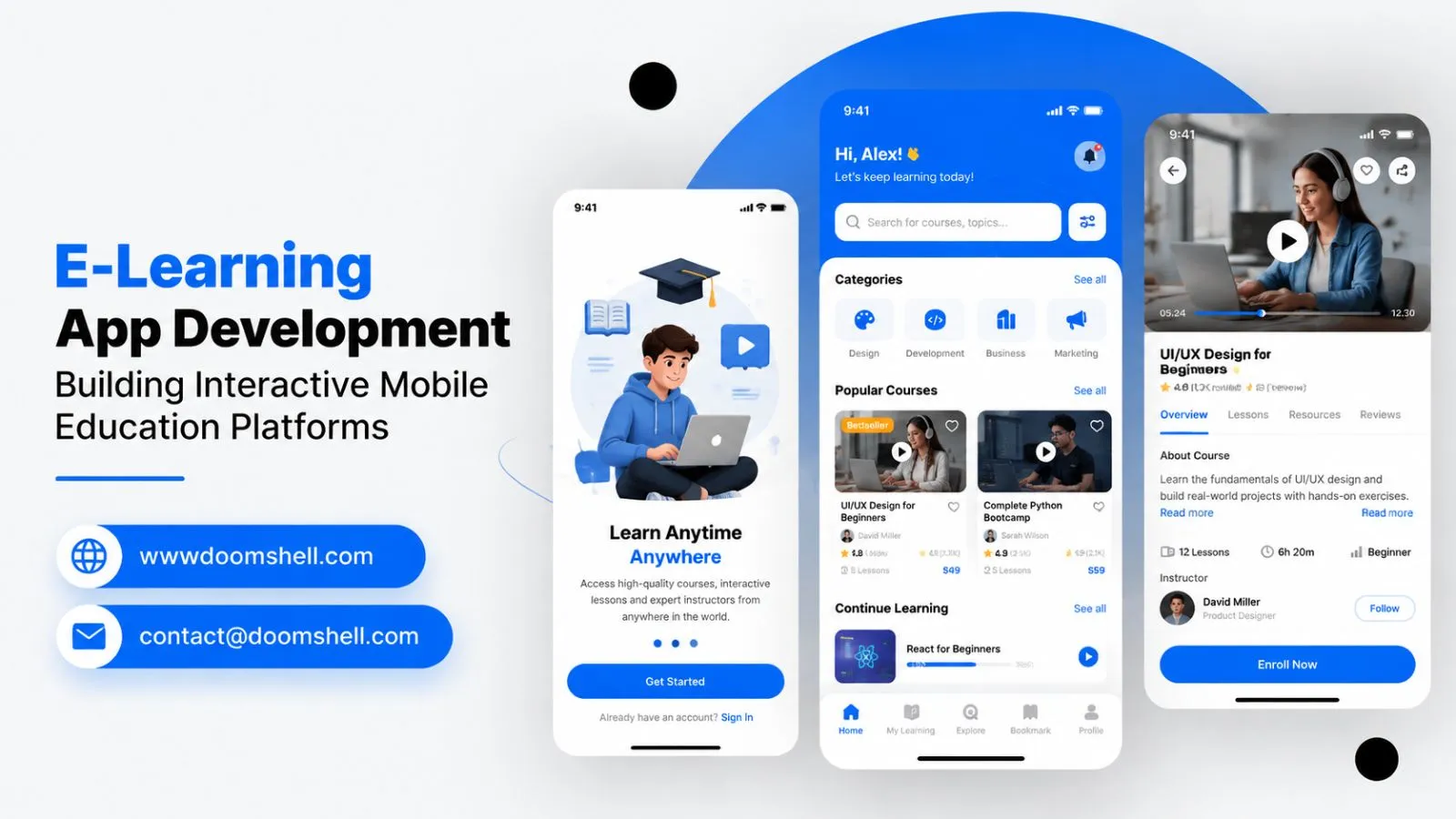
Course organization directly affects how easily students use an education app. A structured interface should display course descriptions, learning objectives, lesson lists, instructor details, and completion status. Students should know what to study next and how each lesson contributes to the overall course.
A practical lesson interface can include video or reading content, notes, attachments, quizzes, and a clear next-step action. Search and category filters also help users find relevant courses quickly. For longer programmes, developers can divide content into modules and smaller lessons. This structure supports microlearning, where learners study focused topics in shorter sessions.
The interface should also consider accessibility. Readable typography, captions, clear contrast, screen-reader support, and simple controls help people with different learning needs. Consistent navigation reduces confusion and allows students to concentrate on the subject rather than learning how to operate the application.
Developing Personalized Learning Experiences
Every learner has different goals, knowledge levels, and study habits. Personalized learning features can make an application more relevant by recommending lessons based on course selection, previous activity, assessment results, and learning progress.
For example, an application can suggest revision material when a student performs poorly in a quiz. It can also recommend the next lesson after a learner completes a module. More advanced platforms may use AI to support content discovery, provide guided explanations, or help teachers identify topics where students need additional support.
Personalization should remain transparent and educationally responsible. Recommendations must be based on relevant learning signals, while student data should be protected through suitable permissions and security controls. The goal is to support better learning decisions, not to make unsupported assumptions about a student's ability.
Supporting Video and Live Learning
Video and virtual classrooms have become important parts of digital education. Students expect learning platforms to support recorded lessons as well as real-time interaction with teachers. In 2026, digital learning is increasingly focused on participation, practical activities, and connected learning experiences rather than simply moving classroom content onto a screen.
Building Video Learning Features With Android Development
Video lessons should load reliably and provide controls that make studying convenient. An Android learning application can include adaptive video playback, playback speed settings, subtitles, full-screen viewing, bookmarks, and resume-from-last-position functionality. These features help students learn at their own pace and revisit important explanations.
Developers should consider network conditions when designing video delivery. Adaptive streaming can adjust video quality according to available bandwidth, reducing interruptions for users with slower connections. Media playback tools such as Android Media3 can support modern playback experiences, while caching selected content can improve access in suitable situations.
Video architecture also needs to account for storage, content delivery, access permissions, and simultaneous viewers. Course owners may need controls for publishing, replacing, or restricting lessons. Secure playback and appropriate content permissions can help protect paid or institution-owned educational material.
Creating Live Classroom Interfaces
A virtual classroom should provide a clear space for teachers and students to interact. Essential features may include live video, microphone and camera controls, participant lists, chat, screen sharing, and session scheduling. Depending on the teaching model, developers can also add digital whiteboards, polls, hand-raising, and breakout discussions.
The interface must make classroom actions easy to understand. Students should be able to join a scheduled session, check audio settings, and communicate without navigating through multiple screens. Teachers need controls to manage participants, share resources, and guide the session.
Live classroom development also requires careful technical planning. Real-time communication depends on stable connectivity, suitable media infrastructure, and efficient handling of audio and video streams. Applications should provide useful connection indicators and recovery options when a learner temporarily loses network access.
Developing Interactive Learning Sessions
A live lesson becomes more valuable when students can actively participate. Interactive sessions can include quizzes, polls, question-and-answer activities, shared notes, and collaborative exercises. These features help teachers understand whether learners are following the topic and give students opportunities to contribute.
For example, a teacher explaining a science concept can launch a short quiz during the class. Students submit answers through the app, and the teacher reviews the responses before moving forward. Similarly, language-learning sessions can use speaking exercises and instant feedback to encourage participation.
Session recordings can help students revise missed lessons, subject to institutional policies and participant privacy requirements. Learning platforms should clearly communicate recording status and control who can access saved sessions. Combining live interaction with structured revision resources creates a more complete learning experience.
Improving Student and Teacher Management
An education application must support teachers and administrators as well as students. Separate dashboards and role-based access help each user complete relevant tasks without exposing unnecessary information. A well-planned student management app can connect academic activity, communication, assignments, and performance records in one system.
Building Student Dashboards With Android
A student dashboard should provide a useful overview of current learning activity. It can display enrolled courses, upcoming classes, pending assignments, recent scores, completed lessons, and progress towards learning goals. Important actions should be easy to find, particularly on smaller screens.
Progress indicators help students understand what they have completed and what remains. Notifications can remind them about upcoming sessions, assignment deadlines, or newly published lessons. However, reminders should be configurable so that frequent notifications do not become distracting.
Dashboards can also show personalized recommendations, saved lessons, certificates, and learning history. When data is updated through connected backend services, students can access consistent information across supported devices. Clear loading states and useful error messages are important when connectivity is limited.
Creating Teacher and Instructor Applications
Teachers need tools to manage courses, communicate with students, and monitor participation. A dedicated instructor application can support course creation, lesson uploads, class scheduling, attendance, announcements, and student queries. It can also provide a convenient way to review learner activity without requiring access to a desktop system.
Role-based permissions are essential. For example, an instructor may manage assigned courses, while an administrator controls user accounts, institutional settings, and overall platform access. These permissions should be enforced by backend services rather than relying only on what the mobile interface displays.
Teacher dashboards can highlight students who have missed sessions, have pending assignments, or may need additional support. Such indicators should assist professional judgement instead of automatically labelling learners. A well-designed instructor experience reduces administrative effort and gives teachers more time to focus on teaching.
Developing Assignment and Assessment Features
Assignments and assessments help measure whether students understand course material. An education app can support multiple question types, timed tests, file submissions, descriptive answers, and automated scoring for objective questions. Teachers may also need tools to review submissions, provide comments, and publish grades.
Assessment workflows should be clear from submission to feedback. Students need confirmation that an assignment was received, while teachers should be able to track pending and evaluated work. Notifications can inform learners when results or feedback become available.
The system should also maintain reliable records of attempts, scores, deadlines, and evaluation status. For high-stakes assessments, additional safeguards such as controlled access, server-side validation, and audit records may be necessary. Assessment design should measure learning fairly and should not depend only on automated scores.
Building Scalable Education Applications
An education platform must be prepared for growth in users, courses, content, and institutional requirements. Good architecture helps maintain performance as activity increases. It also makes it easier to introduce new features without rebuilding the complete application.
Integrating Android Apps With LMS APIs
Many educational organizations already use a learning management system or student information platform. LMS API integration can connect an Android application with existing course records, user accounts, enrolments, assignments, grades, and learning resources. This reduces duplicate administration and helps keep information consistent.
Developers should define how the mobile app and backend exchange data. APIs need authentication, authorization, input validation, and clear error handling. Secure token management and encrypted communication help protect student and institutional information.
Integration planning should also consider data formats, synchronization frequency, and system availability. If an LMS is temporarily unavailable, the mobile application should communicate the issue clearly and avoid displaying misleading information. A well-designed integration layer makes future connections with payment systems, video platforms, and institutional tools easier to manage.
Implementing Offline Learning Features
Internet access is not always reliable, so offline learning can make an application more accessible. Students may need to download approved videos, notes, reading material, or practice resources before travelling or entering an area with limited connectivity.
An offline learning app should manage downloads carefully. Users need to see file sizes, available storage, download status, and options to remove saved content. Developers should also define which resources can be stored locally and how long offline access remains valid.
When connectivity returns, the application can synchronize eligible activity, such as lesson completion or saved notes. Conflict handling is important when the same information changes on multiple devices. Sensitive data should not be stored locally without appropriate protection, and paid content may require controlled offline access.
Optimizing Android Apps for Different Devices
Android applications run across phones, tablets, screen sizes, hardware capabilities, and operating system versions. A learning interface should adapt to these differences instead of assuming every student has the same device. Responsive layouts, flexible components, and suitable media settings help maintain usability across a wider range of screens.
Performance optimization should address startup time, memory usage, battery consumption, network requests, and media loading. Developers can use caching, pagination, background processing, and efficient image delivery to reduce unnecessary work. Testing should cover different device categories and realistic network conditions.
Security and maintenance are equally important as the platform grows. Regular updates, dependency reviews, secure authentication, and monitoring help address technical issues over time. Analytics can identify slow screens, failed requests, and features that learners struggle to use. These insights guide improvements based on actual application behaviour.
Doomshell develops custom Android applications with a focus on user experience, secure integrations, performance, and long-term scalability. Its services include application planning, UI/UX design, Kotlin and Java development, API integration, testing, deployment, modernization, and ongoing maintenance. As an IT company, Doomshell can help education businesses and institutions plan mobile platforms that connect students, teachers, and learning resources through practical digital experiences. The right development approach can turn an education concept into an application that is easier to use, maintain, and expand.